
You may wish to compare the effects of different establishment dates, different seasons or different locations on disease levels. This vignette details how you can automate several runs of {epicrop} in R and visualise them.
Fetching NASA POWER data for multiple seasons
Start by creating a list of the dates representing the seasons that
you want to simulate. In this case, since we specify the duration of the
season, there is no need to explicitly state the end-date, that will
automatically be determined by get_wth() with the
duration argument that we pass along in the
purrr::map(). You can use as many start dates, representing
as many seasons as you desire, but for the purposes of speed in this
vignette, only two will be used.
Use build_epicrop_emergence() and
fetch_epicrop_weather_list() to fetch the weather data from
the POWER API. In this example
we will use the IRRI Zeigler Experiment Station coordinates as shown in
the example for get_wth().
library(epicrop)

years <- 2000:2001
emergence_date <- "06-30"
duration <- 120L

ymd <- build_epicrop_emergence(years = years, month_day = emergence_date)
A helper function, fetch_epicrop_weather_list(), is
provided to simplify fetching multiple years of weather data from NASA
POWER that uses very similar arguments to get_wth(). Note
that since we only need the starting date as we have supplied
duration, that the argument is rather
start_date, a single value, not dates. The
function uses the duration value to fetch the necessary
weather data for all years and start dates inclusive of the end of the
last season of the last start date.
wth_list <- fetch_epicrop_weather_list(
  years = years,
  lonlat = c(121.255669, 14.16742),
  start_date = emergence_date,
  duration = duration
)
Using a Helper Function to Model Several Seasons
Now that we have a list of weather data for two seasons we will use
run_epicrop_model() now to run
bacterial_blight() for two seasons and create a single data
frame of the two seasons.
bb_2_seasons <- run_epicrop_model(
  model_fun = bacterial_blight,
  emergence_dates = ymd,
  wth_list = wth_list,
  window_days = duration
)

bb_2_seasons
#> Key: <emergence, AUDPC>
#>           emergence    AUDPC
#>    <epicrop.emerge>    <num>
#> 1:       2000-06-30 33.35499
#> 2:       2001-06-30 23.27681
Visualising Differences in AUDPC Between Seasons
A simple bar chart created using {ggplot2} is an effective way to visualise the difference between the two seasons.
library(ggplot2)
ggplot(bb_2_seasons, aes(y = as.factor(emergence), x = AUDPC)) +
  geom_col(width = 0.5, orientation = "y") +
  ylab("Emergence (YYYY-MM-DD)") +
  xlab("AUDPC") +
  theme_classic()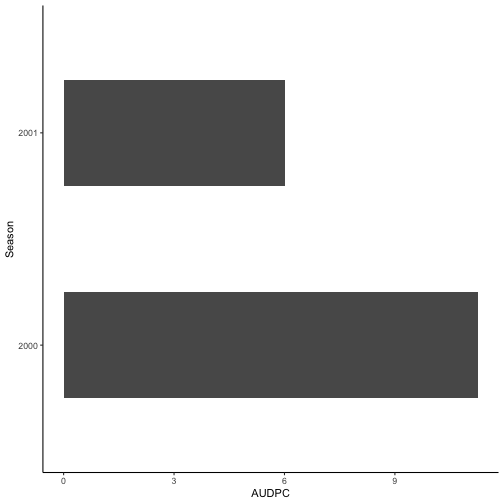
Simulating Multiple Seasons and Establishment Dates
Single Site with Multiple Dates
A helper function, run_epicrop_model() is provided to
simplify running multiple establishment dates.
years <- 2001:2020
month_day <- c("-06-01", "-06-14", "-06-30")
lonlat <- c(121.255669, 14.16742)
duration <- 120L

emergence <- build_epicrop_emergence(years, month_day)

# select 200 days duration to allow for multiple seasonal runs on same data
wth_list <- fetch_epicrop_weather_list(
  years = years,
  lonlat = lonlat,
  start_date = month_day,
  duration = duration
)
 run_epicrop_model(
   bacterial_blight,
   emergence,
   wth_list,
   window_days = duration,
   output = "audpc"
 )
#> Key: <emergence, AUDPC>
#>            emergence    AUDPC
#>     <epicrop.emerge>    <num>
#>  1:       2001-06-01 37.63796
#>  2:       2001-06-14 33.40447
#>  3:       2001-06-30 23.27681
#>  4:       2002-06-01 34.64894
#>  5:       2002-06-14 35.23461
#>  6:       2002-06-30 36.63927
#>  7:       2003-06-01 33.33186
#>  8:       2003-06-14 35.91991
#>  9:       2003-06-30 40.34007
#> 10:       2004-06-01 36.58149
#> 11:       2004-06-14 42.66673
#> 12:       2004-06-30 29.54521
#> 13:       2005-06-01 35.46168
#> 14:       2005-06-14 32.94811
#> 15:       2005-06-30 37.34664
#> 16:       2006-06-01 42.72507
#> 17:       2006-06-14 42.46803
#> 18:       2006-06-30 33.49726
#> 19:       2007-06-01 23.53191
#> 20:       2007-06-14 22.14872
#> 21:       2007-06-30 27.12497
#> 22:       2008-06-01 27.30096
#> 23:       2008-06-14 27.03446
#> 24:       2008-06-30 31.68267
#> 25:       2009-06-01 22.10567
#> 26:       2009-06-14 26.35464
#> 27:       2009-06-30 25.97842
#> 28:       2010-06-01 34.74639
#> 29:       2010-06-14 40.28505
#> 30:       2010-06-30 38.72189
#> 31:       2011-06-01 35.82841
#> 32:       2011-06-14 39.77898
#> 33:       2011-06-30 47.11856
#> 34:       2012-06-01 42.56076
#> 35:       2012-06-14 42.03287
#> 36:       2012-06-30 45.05923
#> 37:       2013-06-01 39.65612
#> 38:       2013-06-14 40.31719
#> 39:       2013-06-30 41.29252
#> 40:       2014-06-01 27.77329
#> 41:       2014-06-14 28.63167
#> 42:       2014-06-30 27.68996
#> 43:       2015-06-01 18.65482
#> 44:       2015-06-14 23.87071
#> 45:       2015-06-30 29.73648
#> 46:       2016-06-01 27.79225
#> 47:       2016-06-14 24.87684
#> 48:       2016-06-30 27.06310
#> 49:       2017-06-01 33.85670
#> 50:       2017-06-14 30.61643
#> 51:       2017-06-30 27.47632
#> 52:       2018-06-01 41.48556
#> 53:       2018-06-14 40.73465
#> 54:       2018-06-30 32.12418
#> 55:       2019-06-01 29.61033
#> 56:       2019-06-14 28.35922
#> 57:       2019-06-30 32.35699
#> 58:       2020-06-01 23.17698
#> 59:       2020-06-14 19.87281
#> 60:       2020-06-30 22.84166
#>            emergence    AUDPC
#>     <epicrop.emerge>    <num>
Multiple Sites and Seasons
Multiple locations can also be simulated using
fetch_epicrop_weather_list() and
run_epicrop_model(). Here Septoria tritici blotch is
simulated for three locations in Western Australia and New South Wales
over two seasons and two planting dates with a 240 day growing
season.
# set up the dates
years <- 2020:2021
start_date <- c("04-15", "05-01")

# using a list of multiple locations
locs <- list(
  "Merredin" = c(x = 118.28, y = -31.48),
  "Corrigin" = c(x = 117.87, y = -32.33),
  "Tamworth" = c(x = 150.84, y = -31.07)
)

wth_list <- fetch_epicrop_weather_list(
  lonlat = locs,
  start_date = start_date,
  duration = 240L,
  years = years,
  mode = "cross"
)

emergence <- build_epicrop_emergence(years, start_date)

run_epicrop_model(
  s_tritici_blotch,
  emergence,
  wth_list,
  window_days = 240L,
  output = "audpc"
)
#>            emergence      AUDPC location
#>     <epicrop.emerge>      <num>   <char>
#>  1:       2020-04-15 0.12638274 Merredin
#>  2:       2020-05-01 0.10437605 Merredin
#>  3:       2021-04-15 0.16522873 Merredin
#>  4:       2021-05-01 0.11348725 Merredin
#>  5:       2020-04-15 0.12254255 Corrigin
#>  6:       2020-05-01 0.10658289 Corrigin
#>  7:       2021-04-15 0.18790666 Corrigin
#>  8:       2021-05-01 0.11734482 Corrigin
#>  9:       2020-04-15 0.10126323 Tamworth
#> 10:       2020-05-01 0.09860009 Tamworth
#> 11:       2021-04-15 0.10325174 Tamworth
#> 12:       2021-05-01 0.10705749 Tamworth